Industries

Trades

Photo boothsDJs and entertainmentCatering and mobile barsPhotographersEvent plannersFlorists and stylistsEquipment and tent rentalVenuesSalons and barbersBridal hair and makeupCleaning businesses

How you work

On your ownWith a teamMore than one brandWeddingsCorporate eventsWith partners
Platform

Sales and customers

Leads and inquiriesOnline bookingProposals and quotesAgreementsCustomer booking page

Running the job

Calendar and schedulingStaff managementInventory and logisticsAutomationsAfter the event

Money and growth

Invoices and paymentsReportsReferrals and partnersBrands and locationsYour data and security
Resources

Help yourself

GuidesPricing calculatorWatch the tourTry a live bookingIntegrations

Choosing Occanovo

Moving from another toolHow Occanovo comparesBook a demo

PricingSign inStart free trial

Home / Industries / Photo booths

Photo booths

Every booking, from first enquiry to event day

Built first for photo booth rental. The inquiry, the proposal, the deposit, the booth and the customer's details, in one place and without retyping anything.

Your clients design their own prints

On their booking page, the couple picks the layout and a style, types their names and date, and watches it take shape at the exact print size. When they save, the finished file is in your inbox. Try it here: this is the same designer your clients use.

Layout

Style

Grey areas are where the photos go. In the file you receive they are see-through.

How a booking goes

This is the path a real booking took through Occanovo, from the website form to the booth on the van. You do the checking. Occanovo does the typing.

Your clients can design their own prints and 360 overlay on their booking page, or sign off a design you send. If you want a written approval, switch it on for that package.

Start to finish

One wedding booking

  1. The inquiryThe couple picks the booth on your website form and gives the date, the start and finish time and what they want on the prints. Your email says all of it.
  2. The proposalPress Create proposal on the lead. The booth, its price, the times and your own introduction are already filled in. Check it and email it from your own address.
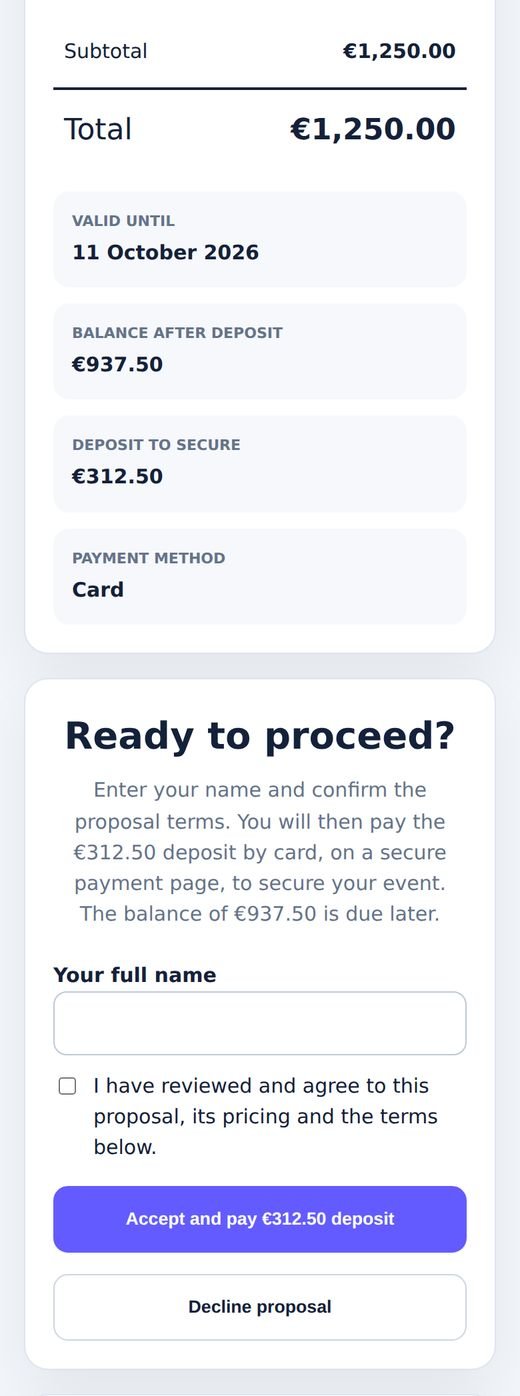
  3. Accept and payThey read it on their phone, accept and pay the deposit by card. The money goes to your own Stripe account.
  4. The bookingThe booking, the invoice and the balance date are made for you. Reserve the booth so it cannot be promised twice.
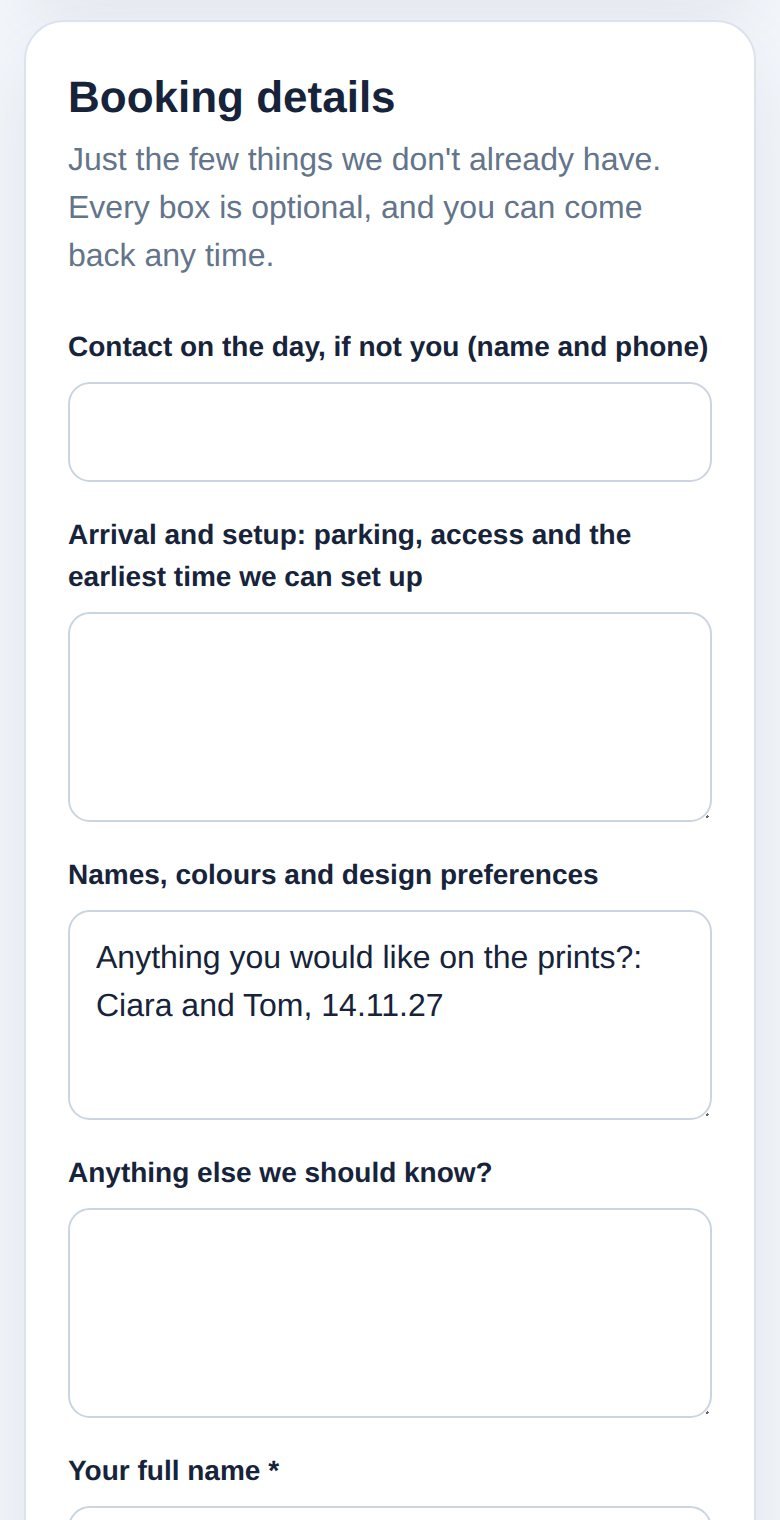
  5. Their detailsThey get a short page to add a contact on the day, parking and setup, and anything for the prints. What they already told you is filled in.
  6. On the dayTick the booth through packed, loaded, on site and returned.

No copying details from one screen to the next.

What it does for photo booth rental

Booths that are never double booked

Each booth is reserved to a job for its hours. The day view puts every booking side by side, so you can see what is free before you say yes.

Proposals in a minute

The proposal starts from the inquiry: the booth they chose, its price, their times and your introduction.

Deposits paid on a phone

Customers accept and pay the deposit by card in one go. The balance date is set from your own terms.

Your brand on everything

Your logo and colors on proposals, invoices, emails and the customer's booking page. A white logo is shown on your color, so it never disappears.

Inquiries in one list

Your website form and your ads land in one list, each with a reply in seconds and an email to you that says what they asked for.

A short form for the customer

Four optional questions they have not already answered. Nobody is asked for their phone number twice.

What they asked for stays with the booking

The booth, the times and the print wording from the inquiry form show on the booking, so whoever designs the prints or loads the van sees them.

One button emails the customer their booking page.

A booking showing the services and answers from the inquiry form
Demo workspace with invented customers and figures.

A booking page the customer does not mind filling in

Only the few things you do not already have, all optional. Their answers from the inquiry are there when they open it.

The same page shows their booking, what they have paid and the balance.

The customer's booking details form on a phone with the print wording already filled in
Demo workspace with invented customers and figures.

Accept and pay on the same screen

The proposal opens on their phone with your logo. They type their name, accept and pay the deposit, and the date is theirs.

A proposal on a phone with an Accept and pay deposit button
Demo workspace with invented customers and figures.

The first 100 businesses get 3 months free.

No card to start. We help you bring your customers and bookings across, and in return we ask for your honest feedback. Your workspace is set up for your country and your kind of business as soon as you sign up.

Start free trial